A simpler way to stay ahead of bills
To track bills, renewals, and subscriptions, keep one list with the next due date, repeat schedule, expected amount, and payment method for each obligation. Review the next seven days weekly and confirm payments before marking them paid. ClearDue Bill Tracker supports this manual routine without a bank connection or signup.
ClearDue Bill Tracker helps you keep those due dates organized in one private dashboard. You can track recurring bills, subscriptions, renewals, utilities, insurance payments, credit cards, municipal services, and other household due dates without turning bill tracking into a complicated budgeting project.
The goal is simple: know what is due, what is overdue, and what is coming up next.
Track bills, renewals, and subscriptions in one place
ClearDue Bill Tracker is built for the everyday job of staying organized.
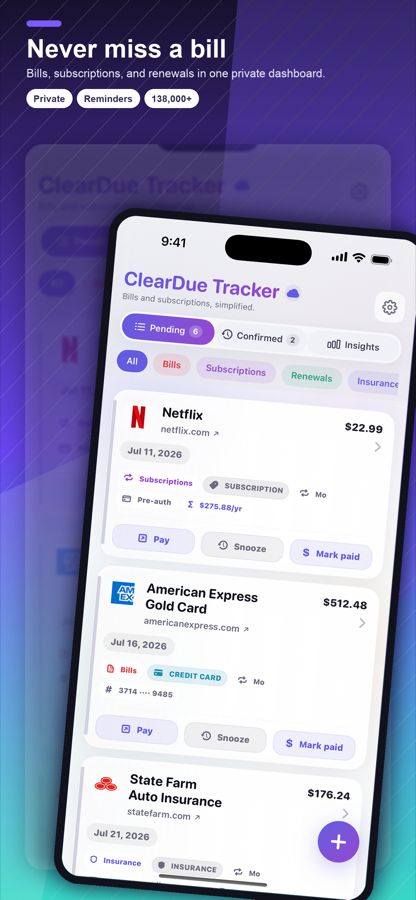
You can add recurring bills and subscriptions, set due dates and reminders, mark items paid, and keep track of what still needs attention. That makes it easier to stay on top of the month instead of trying to remember every payment from memory.
ClearDue Bill Tracker is useful for monthly bills, annual renewals, subscription services, insurance payments, telecom bills, utilities, water, sewer, waste, banking products, credit cards, municipal services, state services, federal services, and more.
Set up faster with provider search
One of the hardest parts of using any bill tracker is getting everything entered.
ClearDue Bill Tracker helps speed that up with built-in search across more than 138,000 preloaded provider entries. That includes utilities, banks, credit cards, subscriptions, insurance, municipal services, state services, federal services, water, sewer, waste, telecom, and other common providers.
If you cannot find the provider you need, you can add your own custom entry in seconds.
Use reminders as a backup to autopay
Autopay is helpful, but it does not remove the need to pay attention.
Cards expire. Bank accounts change. Payment amounts increase. Renewal dates sneak up. A service can fail to process a payment. A subscription can renew before you remember to cancel or review it.
ClearDue Bill Tracker gives you a simple reminder layer around those due dates. You can see what is coming up, mark items paid, and spot overdue items before they become a bigger problem.
See what is coming next
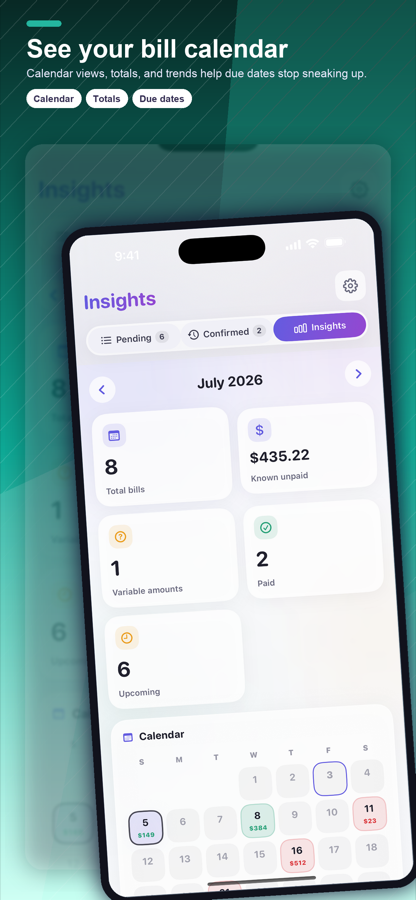
ClearDue Bill Tracker includes calendar-style insights so you can see upcoming bills and due dates more clearly.
Instead of checking separate accounts one by one, you can build a habit of reviewing what is coming next. That helps with planning, avoids surprises, and gives you a clearer picture of your household payment schedule.
Apple Calendar sync is also available, so due dates can appear alongside the rest of your schedule.
Helpful tools for everyday bill tracking
ClearDue Bill Tracker includes practical features designed around real household organization.
You can track bills, renewals, and subscriptions in one place, set smart reminders, mark items paid, view upcoming due dates, use provider search for faster setup, create custom entries, sync due dates with Apple Calendar, and use Home Screen widgets to keep upcoming bills visible.
The app is designed to help you stay organized without overwhelming you.
Premium features for heavier bill tracking
For people who want more advanced tracking, ClearDue Bill Tracker Premium unlocks unlimited reminders, bill scanning, iCloud sync across devices, Apple Calendar sync, full history, spending insights and reports, smart renewal protection, and variable amount tracking.
Unlimited reminders and additional tools make Premium useful if you manage many bills, share devices through iCloud, want deeper history, or need better visibility into spending patterns and renewals.
Private by design
ClearDue Bill Tracker is designed with privacy in mind.
Your data stays on your device and in your iCloud account if iCloud sync is enabled. ClearDue Bill Tracker is not affiliated with any service provider. Provider names and icons, if enabled, are shown for identification only.
On-device bill storage means you can organize your bills and reminders without handing your household bill list to a provider marketplace or third-party service.
The bottom line
ClearDue Bill Tracker is for people who want a simpler way to manage bills, renewals, subscriptions, and recurring due dates.
ClearDue Bill Tracker helps you track what is due, set reminders, mark items paid, spot overdue items, and see what is coming next. With provider search, custom entries, Apple Calendar sync, Home Screen widgets, and Premium bill reminders, it gives you a practical way to stay ahead without the stress.
How do you keep paid status accurate?
Use scheduled for a payment you have arranged and paid for a payment you have checked. A fictional electricity bill due Monday might be scheduled on Friday but still awaiting confirmation. Keep the provider’s confirmation or account status available until you know the result. A tracker checkbox is your record of that check, not a transaction receipt.
If the amount or due date changes, update the bill using the current statement. If a service ends, confirm cancellation with the provider before removing future reminders. When two people review the same household bills, agree who performs each action and where confirmations are recorded.
Check the list after changing phones, payment cards, or providers. Those changes can affect alerts and automatic charges even if the bill name looks unchanged. Review the next seven days, then look ahead for quarterly or annual renewals that do not appear in the usual monthly routine.